
For a better viewing experience while we update our website, see this post on Linked In : Productivity Features of Apple Accounts

Scott Morabito | January 21, 2026
>> Not written by AI <<
A note to readers: This is a multi-part article. This second article focuses on the productivity features with Managed Apple Accounts. The first article in the series discusses Apple’s Motive.
Does productivity provide a compelling value-add to Managed Apple Accounts? Let’s take a look.
We are continuing to analyze the value proposition of Managed Apple Accounts for your organization. In the last article, I examined Apple’s motive for pushing and encouraging businesses to use them. (See full article here). I’m a pessimist and don’t want to waste my time being part of a sales cycle for big corp. I’ve come away from that analysis with a better perspective: data privacy and control by individuals and organizations is a solid push.
Apple isn’t leading the discussion with a focus on user productivity but there are productivity gains for organizations as a whole.
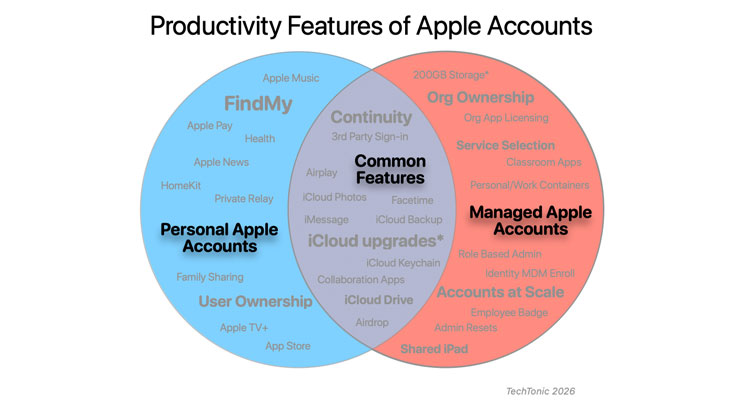
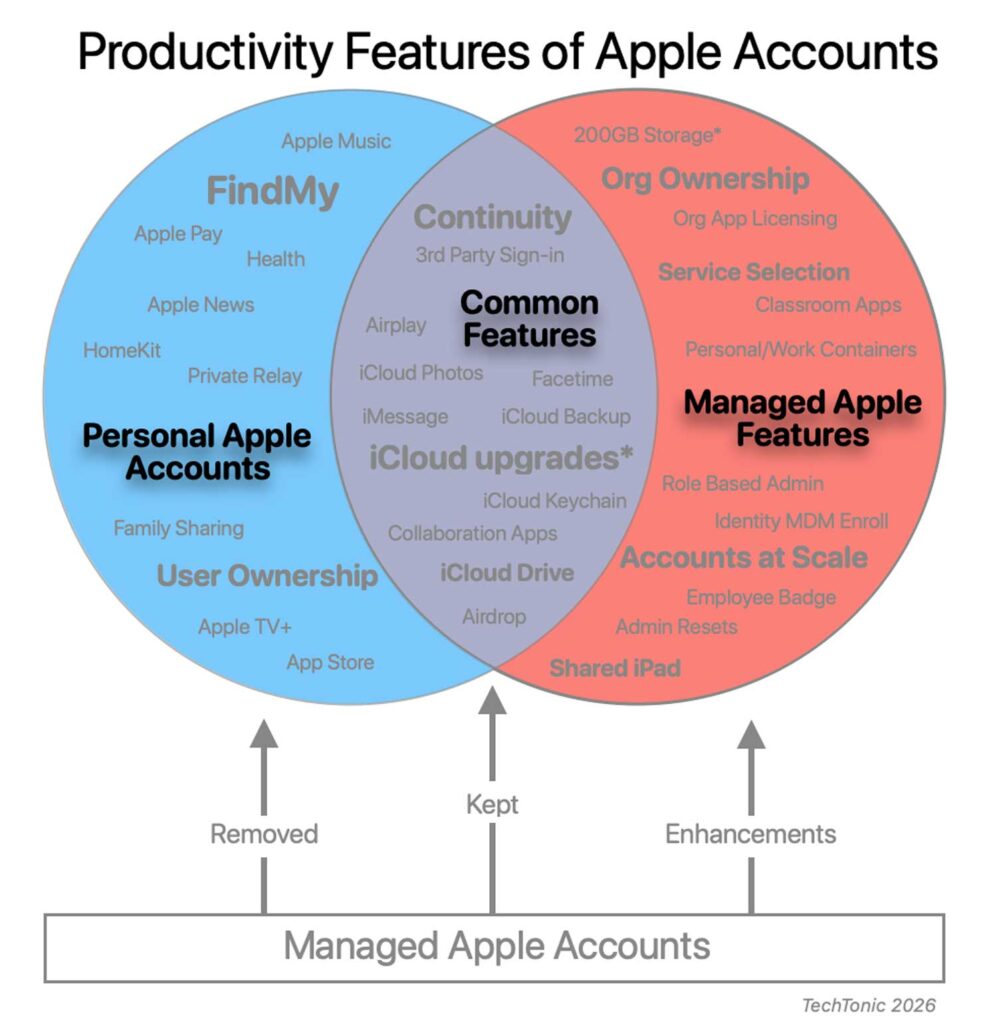
Wins: User Productivity Enhancements of Managed Apple Accounts.
Here’s a reminder – If you’re looking for an amazing employee user productivity feature of Managed Apple Accounts that’s going to drive your decision, you can stop reading. With the exception of Shared iPads for education, the productivity enhancements are interesting and nice addition to workflows but not compelling inherently. That said, what are we working with?

For user productivity, the show stealer is Education. Managed Apple IDs began 10 years ago with Shared iPad in 2016.
Extra Education productivity enhancements to Managed Apple Accounts
- Shared iPad – students can sign into an iPad with their Managed Apple Account and their personalized documents and data are not shared with other students
- Schoolwork and Classroom apps – These are both apps designed for management of classroom devices along with assignment and progress aids. Consider Apple’s education offering here a complementary or alternative to Google ecosystem of Chromebooks and Google Classroom – especially in smaller iPad first or private school / curated instructional models.
- 200GB iCloud Storage (up from 5GB)
Extra Employee productivity enhancements to Managed Apple Accounts.
- Employee Badge in Apple Wallet – This allows staff to use their phone or watch instead of physical badges on lanyards (1). Any NFC systems installed after 2012 are likely compatible with the ISO/IEC 14443 NFC standard that current smartphones use. The benefit within an Apple Account is integration with device biometrics adding to ease of use. Using an employee badge behind a smartphone removes the risk of someone stealing a lanyard badge for access.
Business Wins: Business Productivity Enhancements of Managed Apple Accounts.
In terms of business productivity, the IT department is the winner due to increased efficiencies with setup and ongoing management.
- Account creation at scale – Employees can use Microsoft/Google to sign into their Apple Accounts simplifying setup. These efficiencies save time.
- Apple Account Service Management – Admins can globally control iCloud and Apple app communication from Apple Business Manager instead of performing fancy device based blocks with MDM. Time and complexity saved.
- Organization ownership – The org owns the account, its access, and can revoke as needed. This avoids chaotic data chasing tasks at offboarding.
- Password management – Standard workflows for password resets, lockouts, etc. Efficiencies gained by using 1 centralized admin console.
- Device MDM Enrollment via Apple Account – This experience is similar to Windows which when you want to Domain Join Azure AD via “Access work or school” (2) . This is the newer Account-Driven Device Enrollment possible with Jamf and other popular MDMs
- User MDM Enrollment via Apple Account (BYOD) – Similar to above but using our Windows analogy it would be like Register with Azure AD. IT gets less (but reasonable) control, users still get some resources.
- User account based licensing – This is a limited use case but If you were using personal user licensing for app assignments (instead of device licenses), those were non revocable. Licensing to Managed Accounts can be revoked and reused.
- The enrollment methods available with Managed Apple Accounts are very helpful for IT. The entire enrollment process is simplified and data segmentation is improved. Weird URLs, prompts, and device wipes for enrollment are a thing of the past.
Regarding the Security features of Managed Apple Accounts, this will be covered in a following article focusing on security.

Losses: What Productivity Features do Managed Apple Accounts Lose?
As discussed in the previous article (here), there are legal reasons with how Managed Apple Accounts are built.
Some productivity features of Personal Apple Accounts are not available to Managed ones. The good news is that it all makes sense.
Low Impact
- Apple subscriptions like Apple Music, AppleTV, Apple Fitness
- iCloud Mail, iCloud Family Sharing
- Health and Journal apps/data
- Home app management
- iTunes Store
- Full user ownership and control over the account (tied to any email account) – From a personal productivity standpoint, if you saved info in a Managed Account and then leave an org you’ll lose access to that data. Overall however, this is a win for the org.
These all make 100% sense. I can’t envision strong business use cases for these – especially because Apple has the proper architecture on devices to allow for personal Apple Accounts if we want. For example if we have a presentation iPad and we want to listen to music – go ahead and add your personal account alongside the business one.
Some Impact
- iCloud storage upgrades – Individuals cannot upgrade iCloud storage. This ability is now in the hands of IT and is possible – but currently only possible if you’re using Apple Business Essentials (ABE) for Device Management. Most of our customers are using a full featured Device Management tool and therefore out of luck. My expectation is that Apple is experimenting with ABE and will eventually make this option more widely available. Apple – if you’re reading this – we have many customers willing to pay for this.
- Personal App Store Purchases– For Apps from the App Store (think iOS or iPadOS), IT will manage the app purchase/license and deployment (even if it’s a free app). This introduces a delay with app deployment and necessary. By virtue of your organization type and security policy, we cannot expect individual employees to make calls on org data exfiltration and analysis.
- Apple Pay– I can see use cases for employees wanting to use the corporate card with Apple Pay. This impact should be somewhat limited to event organizers, office assistants, and the like.
- Find My (tracking of devices, friends, or AirTags. Activation Lock) – Constant location tracking gets into shady territory. The Device Management server has some tracking capabilities to assist with lost or stolen devices. In addition, Device Management allows IT to enable Lost Mode ore Remote Lock on devices mimicking Find My ability.

Keepers: What Productivity Features do Managed Apple Accounts Keep?
There are some productivity features of Apple Accounts that you may already be using and want to continue to use in Business. They fall into 2 categories: Executive and Small business.
Executive Productivity
For many executives and power users, a Mac and an iPhone are both used regularly for work. These are Mac + Mobile workflows focused on executive style situations.
>>> Continuity – This is where a lot of Apple magic is packed in.
- iPhone Cellular Calls and SMS relay – Phone calls and SMS messages go transparently between devices.
- Wi-Fi & Bluetooth sharing – Set them up on one device and the others have it.
- AirPod device switching. – AirPods auto connect to your active device. Not formally part of Continuity but close enough.
- Instant Hotspot – No passwords needed to join your Mac to your iPhone. It just works.
- Sidecar – An iPad instantly becomes a second display. Great for increased productivity in the conf room or coffee shop.
- Hand off – You start an email on your phone and realize it’s going to be more involved. Go to your Mac and finish it.
>>> iCloud solo productivity
There are a number of good use cases for using iCloud instead of your organization’s primary storage. Specifically we all have grey area projects or transitional tasks. We may not have formal material to save on the server or may not be ready to share it yet. We may be in the middle of collecting and organizing information so we want to use our local computer first.
- iCloud Drive – Great for temporary storage, especially if you’re working between a mobile device and a computer. Save an attachment from an email to iCloud Drive on your phone – look at it later from your computer.
- Notes – Jot down ideas from a meeting, create a follow-up list for a colleague etc. Saving to a note from your iPhone will be on the computer vice versa.
- iCloud Photos – While on a site visit or corporate event you take photos and they’ll be available to manage from the Photos app on your computer when you return to the office.
Small or Niche Business Workflows
There are a couple of niche workflows that may be compelling for a small business or siloed team. This could work if you don’t need to tie into a corporate infrastructure. Goal is flexibility and ease of use while not sharing your personal Apple ID
- iMessage and FaceTime -These tools work great in B2C situations. Perhaps you want to use a work account for communicating with your clients or customers. Examples may be an attorney practicing family law and communicating informally with clients, or homeowners working with an interior designer. The important piece is informality and simplicity for customers and clients. Goal is flexibility and ease of use while not sharing your personal Apple ID
- iCloud Keychain sync – The iCloud keychain is better than using a web browser or note to store passwords because they will provide access to apps and sync between devices
- Collaboration apps – This is a good alternative to Google Docs or Word for the web. Flagship apps include Pages ,Numbers, and Keynote. These offer real-time collaboration like Google Docs.
- Shared albums – Share select photos from a corporate location or event with small team
Honorable Mention
There are a few misfit features we don’t want to forget about.
- Airdrop – when signed in with an Apple Account, Airdrop gets some additional controls. If you have a peer group you share with regularly, they can share with you by default.
- Airplay – Using Apple Account with Airplay unlocks more security to AppleTV and Apple device broadcast. This allows for more granular access as opposed to open casting or entering screen code.
How do these stack up?
Employee productivity is not a compelling reason to utilize Managed Apple Accounts for most of us. This is a big reason I wrote a detailed article on Apple’s Motive for Apple Accounts to understand what’s going on. Productivity in this context is focused on Education and Business (IT Dept) productivity – these are actually quite important.
We win some, we lose some. I hope the thorough analysis of every Apple Account feature helps drive the conversation about Productivity
Scott Morabito is a technologist and founder of TechTonic. He is a computer scientist and resides in Concord MA